How to Sit Properly While Working from Home
Many employees in today’s industry sit for more than half of the working day. This is the reason it’s crucial to master good sitting posture.
Despite the fact that our bodies were designed to move, we are spending more time in sedentary settings that limit our levels of physical exercise and force us to sit for extended periods of time.
Sitting with poor posture can lead to:
- Neck and back pain
- Forward head posture
- Rounded shoulders
- Hyperkyphosis
- Anterior pelvic tilt
- Bulging discs
- Muscle stiffness
- Decreased mobility
- Poor balance
- Decreased athletic performance
Walking, standing, sitting, or lying in a way that puts the least pressure on your body’s supporting muscles and ligaments is considered good posture.
Advantages of good posture are:
- Maintains the right position of bones and joints to promote effective muscle usage.
- Helps in lessening abnormal joint surface wear and strain.
- Reduces the strain on the spinal ligaments.
- Avoids improper postures of the spine.
- Avoids tiredness of the muscles.
- Prevents health issues such as sprains, strains, and overuse problems.
- It enhances someone’s look.
- Enhances the feeling of self.
Table of Contents
10 Pointers for Correct Computer Desk Sitting Position
1. Maintain a neutral pelvis while resting your buttocks into the chair’s back.
Your pelvis is the starting point for good desk sitting posture. Your buttocks should be pressed up against the back of the chair while your pelvis is in a neutral posture.
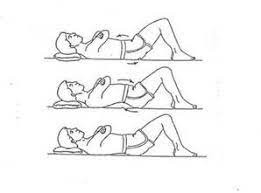
Perhaps you’re wondering… How can I sit with my pelvis in a neutral position? To achieve a neutral pelvis, you must first identify your sitz bones. When you put your hands behind your buttocks, these bones are the most noticeable ones.
After locating these bones, bend your lower back and tuck your pelvis down; the sitz bones will begin to feel flat beneath your hands. Now arch your lower back and bring your pelvis forward. When your position bones separate from your hands, all of your weight will move to the back of your thighs.
A neutral pelvis is somewhere between the slouched and leaning forward postures. When your pelvis is in a neutral posture, your sitz bones will feel acute.
If you sit with your pelvis in a neutral position and your buttocks on the back of your chair, your pelvis will not tilt forward (anterior pelvic tilt) or backward (posterior pelvic tilt).
2. Maintain alignment of your hips, shoulders, and ears.
Maintaining the alignment of your hips, shoulders, and ears helps preserve the natural curvature of your spine. Any departure from this posture can cause your spine’s natural curves to move, increasing your risk of injury and putting undue strain on your spine.
3. Use a back support to maintain the typical low back curvature.
Your lordotic curve is located in the lower back, which should have a slight curvature. Without support, your back tends to bend in the opposite way, a condition known as kyphosis (hunchback), making your lower back more susceptible to disc herniation and sprains and strains. One easy way to support the lower back is to use a small cushion or a rolled-up towel.
4. Hold a 90-degree angle with your knees and hips.
When sitting at work, try to keep your knees almost parallel to your hips. This position helps to maintain a neutral spine posture. When you sit on a chair that is too low, your knees are above your hips, but when you sit higher up, your hips are significantly higher than your knees. These two positions put too much strain on your back and can cause stiffness and pain.
5. Spread your weight equally over both hips; do not tilt to one side.
While sitting at your computer, it may be tempting to lean to the side. However, this unhealthy habit leads your spine to bend, which can result in problems including disc herniation, scoliosis, and sprains and strains. When sitting, make sure your weight is spread equally over both hips.
6. Use a footstool if needed, but keep both feet flat on the ground.
The big supporting muscles of your back, pelvis, and hips are stressed when you cross your legs or just touch the floor with your toes. You also obstruct healthy blood flow. Another issue with the crossed-leg posture is that it makes you lean slightly to one side and puts more strain on your lower back, which causes your pelvis to become imbalanced.
7. Place your forearms on your desk with them parallel to the floor.
By reclining on your desk with your forearms parallel to the floor, you may reduce the tension on the joints in your upper extremities. To avoid constantly reaching forward to use your keyboard and mouse, make sure you position them at the proper distances from your body. Your shoulders will begin to move forward if you must extend your arms to reach your keyboard and/or mouse. Pain in the upper back and rounded shoulders might arise from this.
8. Position the top third of your computer monitor at eye level, 18 to 24 inches away from your face.
You will put undue pressure on your neck if your computer monitor is positioned wrongly since you will have to gaze up and down all the time. This increases your risk of headaches, cervical disk herniation, and neck sprains and strains.
9. Regularly check that your head is not protruding forward.
This is a bad habit that you should be aware of and actively work to avoid. According to research, the weight on your neck increases by 10 pounds for every inch your head moves forward! Protruding your head forward when seated can lead to forward head posture, which can result in an array of health issues including neck and back pain, muscle spasms, arthritis of the neck, restricted breathing, headaches and migraines, insomnia, sleep apnea, chronic fatigue, numbness and tingling in your arms and hands, and temporomandibular joint (TMJ) pain.
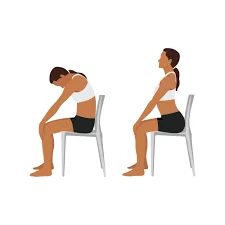
10. Take periodic breaks & stretch out.
At least once per hour, try to move around your workplace and take a quick break from sitting. This may lessen pain and help avoid tense muscles. To ease tense muscles and increase blood flow, consider performing easy stretches during your breaks. You can perform the following easy workouts at work:
- Range of motion of the neck (rotation, flexion, and lateral flexion)
- Shoulder shrugs
- Calf raises
- Ankle pumps
- Lunges
- stretch
What position is ideal for the body when sitting?
It is not advised to sit in a single body position. By modifying the angles of their hips, knees, ankles, and elbows, any employee may sit comfortably. The general suggestions are as follows. Periodic deviations from specified ranges are permissible and occasionally advantageous.
Recommendations for sitting positions:
- Maintain a 90° or slightly higher angle at the hips, knees, and ankles.
- Maintain knee joints at or below the hip joints.
- Ankle joints should remain in front of the knees.
- Maintain a space three fingers wide between the front border of the seat and the rear of the knee joint.
- Lay feet flat on the ground or on a footrest.
- Maintain an erect posture with the upper body straight (not twisted).
- Maintain the backrest’s lumbar support in your lumbar area (lower back curve).
- Avoid twisting and maintain a straight back.
- Maintain the head and spine in alignment.
- Maintain your upper arms between vertical and 20° forward.
- Avoid elevating or lowering your shoulders, and keep your elbows close to your torso at an angle of around 90 degrees.
- Maintain a straight wrist alignment with your forearms.
- Position the working item at a viewing angle between 10° and 30° below the line of sight.
- Keep your shoulders relaxed and low.
- Keep your elbows tucked in.
- When gazing down and ahead, tuck your chin under and avoid bending forward.
- Move about a lot, but stay within the suggested boundaries.
- Alternate crossed legs
- Do not stoop to the side.
- Do not stoop forward.
- Avoid slouching.
- Avoid sitting for longer than fifty minutes at a time.
- Avoid this position if you need to use a lot of force to do chores.
How Can I Create an Ergonomic Desk?
To create an ergonomic home office:
- Use seat cushions and foot or back rests to keep your spine neutral.
- Set the height of your computer screen to a comfortable level.
- To prevent poor posture, change your position (e.g., working in bed or at a desk while standing).
- Your keyboard and mouse must be at elbow level.
1. Keep Your Spine Neutral
Keeping your posture neutral is essential to having a pain-free back. This implies that to keep your spine balanced, you must preserve its natural curvature without overflexing or overextending.
When seated, keep your chin slightly tucked in and your head aligned with your shoulders. You should not hunch your shoulders; instead, they should be relaxed. Make sure your lower back is adequately supported while you recline in your chair. Leaning forward puts additional strain on your spinal column, so avoid doing so. Your knees should point directly forward, and your hips should be level. Your feet need to land on a footrest or the ground.
2. Place your computer screen at a comfortable height
Your computer screen should be positioned such that you can see it at eye level or with a straight neck. To reduce glare from windows or interior lights, sit an arm’s length away from your screen.
Keeping your phone and other often-used workplace supplies close at hand will also be beneficial. If you need to switch between your screen and reading materials, use a document holder.
3. Set your mouse and keyboard at elbow height
Ideally, your mouse and keyboard should be level with your elbows and straight forearms. This will guarantee that your shoulders are at ease. The best way to prevent impinging nerves from your neck and shoulder that go down your elbow and wrist is to keep your arms at your sides.
Make sure your body is centered in the area of the keyboard that you use the most. To correctly use palm support, place your palm’s base on the keyboard’s palm support. People frequently place their wrists directly on the cushioned surface. Carpal tunnel syndrome symptoms may worsen if you use it incorrectly since it puts more strain on the nerves in your wrist.
4. Working on a bed, standing at a desk, and other configurations
It’s important to remember that your spine should follow its natural curvature if you enjoy standing while working. To reduce the strain on your back, you can place one foot on a stool. For people who like to utilize standing desks or work while standing, there are footrests made especially for them.
If you frequently work on your bed, you should use a table next to your bed or place your laptop on your lap to get the best possible view of your screen. To prevent needless strain, you must also make sure that your back is sufficiently supported while maintaining the correct alignment of your spine and joints.
Tips on improving posture:
1. Sit up straight.
An upright spine is the foundation of excellent sitting posture. The entire body’s kinetic chain can be impacted by prolonged sitting in a stretched or slouched position, starting with hip deviations that cause back pai, stiff neck, tight hips, knee pain, and weary feet. The more you can maintain an upright spine and rest your head above your shoulders, the better, but this is easier said than done. In order to avoid hunching your shoulders or back or stooping your neck, we advise setting your laptop at a comfortable height. Additionally, use a wrapped towel or a little cushion to support your lower back.
2. Raise Your Feet
Did you know that an individual’s ankles and heels account for 19% of their total weight? To assist in dispersing the pressure evenly throughout your body, release some of the pressure off your feet and place them on an appropriate footrest. Remember that crossing your legs when seated might cause postural abnormalities and imbalances.
3. Stretch Frequently
Long periods of time spent in one posture can cause some muscles to be overused, which weakens the opposing muscles and causes the muscles to constrict. These abnormalities can lead to major posture-related issues in the body over time. A few simple dynamic and static stretches can help with posture correction, blood circulation, and temporary stress relief.
FAQs
How can you work from home with better posture?
Adjust your workplace so your monitor is at eye level; keep your feet flat on the floor with your knees at a 90-degree angle; sit all the way back in your chair with lower back support; and take quick movement breaks every 30 to 60 minutes to improve your posture when working from home.
How can I spend hours sitting comfortably?
Establish an ergonomic workplace with your feet flat on the floor, your knees at a 90-degree angle, and your display at eye level if you want to sit comfortably for extended periods of time. The majority of Reddit users concur that taking quick movement breaks every 30 to 60 minutes is more important for long-term comfort than maintaining a static posture.
How can I tell whether I’m sitting correctly?
Examine your body alignment from head to toe to see whether your sitting posture is proper. Your knees should be bent at a 90-degree angle so that they are level with your hips; your feet should be flat on the floor, and your back should be supported by the chair so that your spine retains its natural curvature.
Is two hours of sitting acceptable?
It is not good for your health to sit for two hours straight. It can cause muscular stiffness, lower blood supply to your legs, and impair your metabolism. Health professionals advise taking a little exercise break at least every 30 to 60 minutes, even tho it won’t hurt you permanently on its own.
What is the ideal seating position?
Maintain your feet flat on the floor, your knees at or slightly below your hips, and your back straight with lower-back support to attain good sitting posture. Straighten your head over your shoulders, relax your shoulders, and bend your elbows to a 90-degree angle.
References:
- Mitali & Mitali. (2021, July 3). Tips to improve your posture while working from home | Physique 57 India. Physique 57 India | Signature Barre Workouts & Full Body Fitness. https://physique57india.com/blog/tips-to-improve-your-posture-while-working-from-home/
- Government of Canada, Canadian Centre for Occupational Health and Safety. (2025, August 28). Working in a sitting position – good body position. https://www.ccohs.ca/oshanswers/ergonomics/sitting/sitting_position.html
- McQuilkie, S., DC, & McQuilkie, S., DC. (2024c, November 21). Proper sitting posture at a desk – 10 tips. Back Intelligence (Creators of PostureFlow App). https://backintelligence.com/proper-sitting-posture-at-a-desk/