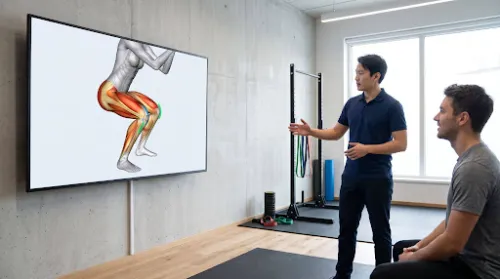
How 3D Exercise Animation Can Help Patients Understand Correct Movement Technique
Every physiotherapist knows the moment when a patient returns for a follow-up, demonstrates their home exercise, and something is clearly off. The knee drifts inward during a squat, the shoulders creep up during a row, or the lower back arches during a bridge. The patient has been practicing faithfully, just not correctly.
How can patients learn correct exercise technique when the physiotherapist is not there to watch?
This is where exercise movement visualization becomes useful. High-quality 3D animations can show a movement from any angle, reveal what happens at the joints and muscles beneath the skin, and highlight the mistakes patients most often make. For physiotherapists, it offers a clearer way to support home programs and patient exercise education, while hands-on assessment stays at the center of care.
Table of Contents
The Problem: Home Exercises Are Easy to Get Wrong
Consider two typical situations seen in physiotherapy clinics:
- A 52-year-old office worker is recovering from knee pain. In the clinic, her squat looks controlled. At home, without feedback, she lets her knees collapse inward and shifts her weight onto her toes.
- A 38-year-old recreational tennis player is rehabilitating a shoulder. He performs his external rotation exercise quickly, using momentum and lifting his elbow away from his side.
In both cases, the patient is motivated and doing the work. The problem is that the movement they repeat at home is not the one their physiotherapist prescribed. Providing a 3D workout animation as a clear visual reference can prevent this exact scenario.
Several factors make this common:
- Patients cannot see themselves. Most people have limited awareness of their own joint and body alignment during movement.
- Written handouts are static. A drawing with two arrows shows a start and an end, but not the path, speed, or control in between.
- Verbal cues fade quickly. Instructions such as “keep your core engaged” or “don’t let your hip drop” are clear in the clinic but easy to forget a few days later.
- Pain and fear change movement. Patients often compensate without noticing, shifting load to another joint or muscle.
Without a clear reference, patients fill the gaps with guesses. Over time, those guesses can slow progress down or even aggravate the original problem.
What 3D Exercise Animation Can Show That Handouts Cannot
A 3D animation is not just a moving picture of an exercise. Because the model is built in three dimensions, the viewer can rotate it, slow it down, and look beneath the surface. This makes several key elements of technique visible.
- Joint position. Animation can show where each joint should be at the start, middle, and end of a movement. For example, it can show the knee tracking over the second toe during a squat, or the elbow staying close to the body during a rotation exercise.
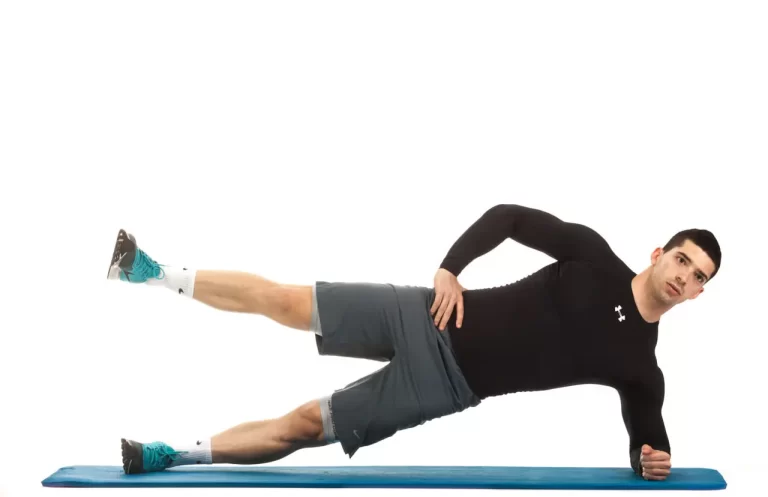
- Direction of movement. Arrows and motion paths show not only where a limb starts and finishes, but the route it takes. This helps patients understand that a leg raise should move straight up rather than swing outward.
- Joint and muscle movement. Transparent or layered views reveal how bones glide within a joint and which muscles contract to produce the movement. A patient doing a glute bridge can see the gluteal muscles working rather than the lower back taking over.
- Posture and body alignment. Side and front views make it easy to compare a neutral spine with a rounded or overarched one. Patients can see what “stand tall” or “keep your pelvis level” actually looks like.
- Speed and control. Animation can demonstrate a slow, controlled tempo, including the lowering phase that patients often rush.
- Common mistakes. One of the most useful features is the side-by-side comparison. Showing the correct movement next to a typical error helps patients recognize what to avoid.
| Common Mistake | What the Animation Can Show |
| Knees collapsing inward during a squat | Knee alignment over the foot, with the hip muscles that control it highlighted |
| Lower back arching during a bridge | Neutral pelvis and spine, with the gluteal muscles doing the work |
| Shoulder hiking during a row | Shoulder blade movement and a relaxed upper trapezius |
| Using momentum in a leg raise | Slow tempo and a consistent path of movement |
| Hip dropping during single-leg balance | Level pelvis and the role of the hip stabilizers |
How Physiotherapists Use Exercise Animation in Practice
Rehabilitation exercise animation fits naturally into the parts of physiotherapy where patients need to understand and repeat a movement on their own. The possible scenarios are the following:
- Home exercise programs. Instead of a printed sheet alone, patients can receive a short animated clip for each prescribed exercise. They can replay it before every session at home, which keeps the technique fresh between appointments.
- Patient education in the clinic. During the first session, an animation helps explain why a particular exercise was chosen. Showing which joint is being protected or which muscle is being strengthened gives patients a reason to care about technique.
- Telehealth sessions. In video consultations, the physiotherapist cannot adjust a patient’s position by hand. Sharing an animation on screen gives both people the same visual reference, so cues such as “keep your knee over your foot” are easier to follow.
- Digital rehabilitation platforms. Many clinics now use apps to deliver programs, track adherence, and send reminders. Well-designed exercise animations for physical therapy apps give these platforms consistent, clear physiotherapy exercise guidance across every exercise in the library.
- Progression and variation. As patients improve, the physiotherapist can show how an exercise changes, for example from a supported squat to a single-leg version. Seeing the progression helps patients understand where their program is heading.
In each case, the animation does the repetitive part of patient exercise education. This frees clinic time for assessment, hands-on treatment, and individual feedback.
Why Animation Supports, But Does Not Replace, the Physiotherapist
A 3D animation shows the ideal version of a movement, but it can’t see the patient in front of it. That difference matters.
Every patient brings their own body to an exercise:
- Range of motion may be limited after surgery or injury.
- Pain may restrict certain positions for weeks.
- Previous injuries, hypermobility, or long-standing postural habits can change how a movement should be adapted.
- Confidence and fear of movement vary widely from person to person.
Only the physiotherapist can assess these factors, decide which version of an exercise is safe, and adjust it as recovery progresses. An animation of a full-depth squat is not appropriate for a patient who should only go halfway.
Individual observation also catches problems no video can predict. A physiotherapist may notice a subtle compensation, a change in breathing, or a sign of discomfort that calls for a different approach.
For these reasons, animation works best as a reference that reinforces what the physiotherapist has already taught and checked in person. Regular follow-ups, in the clinic or by video, remain essential to confirm that the patient’s technique matches the plan.
Tips for Using Exercise Animation With Patients
Animation is most effective when it is introduced thoughtfully. A few simple habits help:
- Watch it together first. Review the animation with the patient in the clinic, then have them perform the movement while you give feedback.
- Match your cues to the visual. Use the same words the animation highlights, such as “knee over toes” or “ribs down,” so verbal and visual instructions reinforce each other.
- Choose the right version. Make sure the animation reflects the patient’s current stage, range, and any modifications you have prescribed.
- Keep it short. One clear exercise per clip is easier to follow than a long sequence.
- Use multiple angles. Front and side views together give a full picture of posture and body alignment.
- Ask patients to film themselves. Comparing their own video with the animation helps patients spot differences, and gives you useful information at the next appointment.
- Update as they progress. Replace or add animations when exercises are progressed, so the reference always matches the current program.
Final Thoughts: Helping Patients Move Well Between Visits
As most rehabilitation happens outside the clinic, the quality of that home practice depends largely on whether patients understand what correct exercise technique looks and feels like.
3D exercise animation helps close that gap. By showing joint position, direction of movement, muscle activity, and common mistakes, it turns abstract instructions into something patients can see and copy. It supports home programs, telehealth, and digital platforms, and it gives patients a reliable reference between appointments.
Animation cannot assess, adapt, or reassure. That remains the physiotherapist’s role. Used together with individual observation and feedback, visual tools can help patients move with more confidence and get more from every exercise they do at home.